

Introduction
By default, the SSA booking calendar loads immediately when the page loads – even if it’s below the fold and the visitor hasn’t scrolled to it yet. The `defer` parameter delays that load until the calendar is actually visible on screen.
This improves page load performance, especially on pages where the booking form is lower down or where multiple calendar instances exist.
Enabling Defer Loading
Shortcode
To enable deferred loading via shortcode, add the `defer` attribute with a value of 1 to your existing booking calendar shortcode:
[ssa_booking defer=1]By default, defer loading is off. Adding `defer=1` tells SSA to wait until the calendar is scrolled into view before initializing it – instead of loading it with the rest of the page.
You can combine `defer` with other shortcode attributes. For example, to defer a specific appointment type:
[ssa_booking type="your-appointment-type-slug" defer=1]Or with multiple appointment types:
[ssa_booking types="slug-1,slug-2" defer=1]The `defer` attribute works with any valid booking calendar shortcode – just append `defer=1` alongside your existing attributes.
Gutenberg Block
- Select the Simply Schedule Appointments block in the editor
- Open the block settings panel on the right
- In the Performance settings, enable Defer Loading
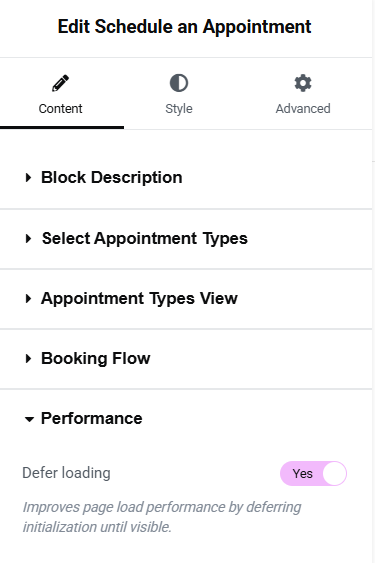
Elementor Appointment Module
- Edit your page in Elementor
- Click the SSA Appointment Module
- In the Performance settings, enable Defer Loading
Beaver Builder Block
- Edit your page in Beaver Builder
- Open the SSA Appointment Module settings
- In the Performance settings, enable Defer Loading
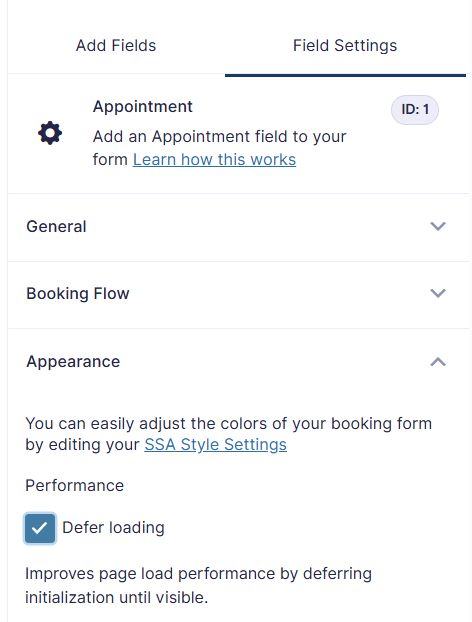
Gravity Forms – Appointment Field
- Open your form in Gravity Forms
- Click the SSA Appointment field
- In the field settings, under Appearance, enable Defer Loading under Performance.
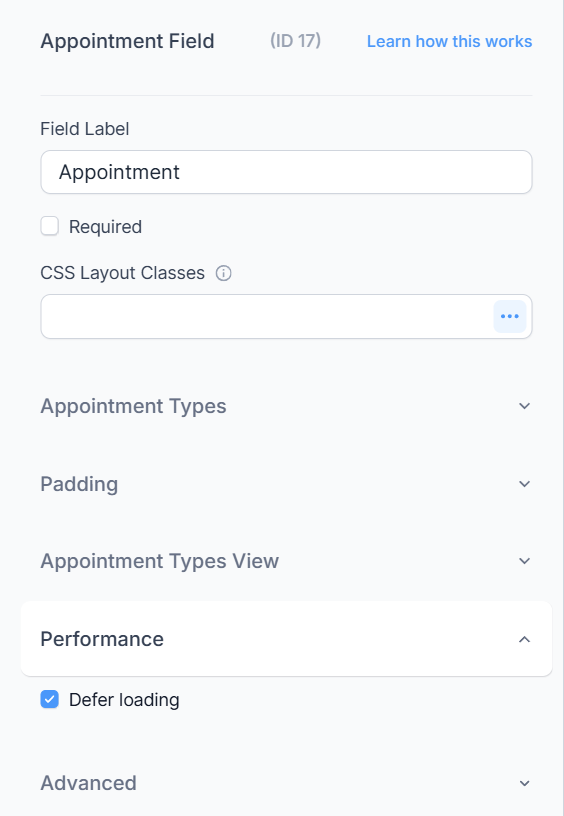
Formidable Forms – Appointment Field
- Edit your form in Formidable Forms
- Click the SSA Appointment field
- In the field settings, under Performance, enable Defer Loading.
When to Use Defer Loading
Use defer loading when:
- The booking calendar appears below the fold
- The page has other heavy content that loads above the calendar
- You’re seeing slow page load scores and the calendar is a contributing factor
- Multiple calendars appear on the same page
You generally don’t need deferred loading when the calendar is the primary above-the-fold content (e.g., a dedicated booking page where the calendar is the first thing visitors see).
Related Guides
-

SSA Queries Loading on All Pages
-
Asset CleanUp Pro Conflict – Redirecting to Homepage
-
All-In-One Security (AIOS): “You are not authorized to perform this action”
-
Google Calendar Not Syncing or Checking for Conflicts